ERP Integration
Shop Floor Data Into Your ERP. Work Orders Back to the Shop Floor. Fully Automated.
The open source data layer for your production data. Automated production confirmations, real-time machine data, and bidirectional exchange with SAP, Oracle, or Microsoft Dynamics. Your other use cases run on the same foundation.
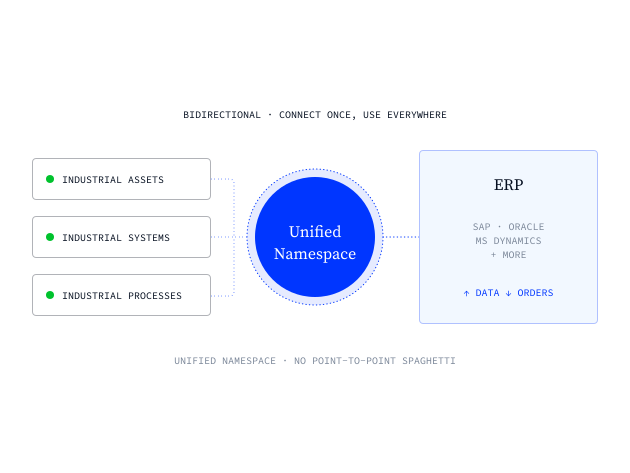

SAP (S/4HANA, R/3), Oracle, Microsoft, and more
Same platform powers dashboards, AI, and analytics
Automated production confirmations, no manual entry
Pull ERP data to the shop floor for OEE, reports, and dashboards
One integration point replaces point-to-point spaghetti
100% open source (Apache 2.0)
Trusted by global enterprises










The Challenge
Moving data between your ERP and the shop floor is hard, slow, and expensive
Production confirmations are manual and failure-prone
Most factories still confirm quantities and order completions through paper or clunky ERP terminals. Wrong quantities, missed bookings, delayed confirmations. Your ERP never reflects what actually happened on the floor.
Shop floor teams need ERP data but can't get it
OEE needs order targets. Shift reports need schedules. Plant leaders need BOM data. But pulling data out of your ERP means another integration project, another budget request, another six months. So teams build workarounds in Excel.
The architecture is the problem
Point-to-point connections between machines and ERP multiply with every new system. Each one is custom-built, each one needs maintenance. What worked for five machines doesn't work for fifty.
"With UMH, we gained real-time insight into our production for the first time. The platform’s flexibility allowed us to connect all our machines and drastically reduce manual data work. This has been a game-changer for our efficiency."

Ludwig Hösl
Head of Manufacturing IT
.avif)
Our solution
One data layer between your ERP, every machine, and every use case.
UMH is the data layer between your shop floor and your ERP. It connects to every machine, contextualizes the data, and makes it available through a Unified Namespace. Your ERP connects once to the UNS and gets data from every machine. Work orders and schedules flow back the same way. No point-to-point integrations. No custom projects per machine.

Machine data flows through UMH into your ERP automatically. Quantities, cycle times, material consumption, order completions. No paper, no manual entry, no typing errors.
Automated production confirmations
Pull order targets, schedules, and BOM data from your ERP into UMH. Use it for OEE calculations, shift reports, and dashboards. One connection, all the data your shop floor teams need.
ERP data on the shop floor
Your ERP connects to the UNS once. Every new machine you add to UMH is automatically available to your ERP. No new integration project per machine. The UNS decouples systems.
Connect once, not per machine
UMH isn't middleware. The same platform powers dashboards, energy monitoring, AI applications, and analytics. ERP integration is one use case on a foundation built for all of them.
More than ERP integration
From shop floor to ERP in four steps
Step
Connect your machines
Pre-built templates for OPC UA, S7, Modbus, MQTT, and more. Select, configure, connect.
step
•
TEXT
Connect your machines
The format:
- 30 minutes to code.
- 15 minutes to discuss what you'd change to make it production-ready.
The format:
- 30 minutes to code.
- 15 minutes to discuss what you'd change to make it production-ready.
The format:
- 30 minutes to code.
- 15 minutes to discuss what you'd change to make it production-ready.
Step
Contextualize the data
Map raw signals to structured production data. Quantities, cycle times, order completions.
step
•
TEXT
Contextualize the data
The format:
- 30 minutes to code.
- 15 minutes to discuss what you'd change to make it production-ready.
The format:
- 30 minutes to code.
- 15 minutes to discuss what you'd change to make it production-ready.
The format:
- 30 minutes to code.
- 15 minutes to discuss what you'd change to make it production-ready.
Step
Connect your ERP
One connection between your ERP and the Unified Namespace. Bidirectional: data up, orders down.
step
•
TEXT
Connect your ERP
The format:
- 30 minutes to code.
- 15 minutes to discuss what you'd change to make it production-ready.
The format:
- 30 minutes to code.
- 15 minutes to discuss what you'd change to make it production-ready.
The format:
- 30 minutes to code.
- 15 minutes to discuss what you'd change to make it production-ready.
Step
Add more use cases
Same data, no extra integration. Reuse what's already in the UNS for OEE dashboards, shift reports, energy monitoring, and AI applications.
step
•
TEXT
Add more use cases
The format:
- 30 minutes to code.
- 15 minutes to discuss what you'd change to make it production-ready.
The format:
- 30 minutes to code.
- 15 minutes to discuss what you'd change to make it production-ready.
The format:
- 30 minutes to code.
- 15 minutes to discuss what you'd change to make it production-ready.
Frequently asked questions.
Which ERP systems does UMH support?
Does UMH replace our ERP?
What about SAP MII and PCo end-of-life?
How does pricing work?
How long does deployment take?
Get the ERP Integration one-pager
Share it with your team or take it into your next ERP integration conversation with management.


START WITH UMH
Connect your ERP to the shop floor. Both ways.
Talk to our experts about your ERP setup. Or explore the platform yourself, fully open source.