Shop Floor Connectivity
Connect Every Asset, Process, and Product. In One Platform.
Build a complete, end-to-end data view across your entire production, from legacy machines to modern PLCs. UMH gives you the connectivity layer to break down data silos and make every process visible, no matter the vendor or protocol.
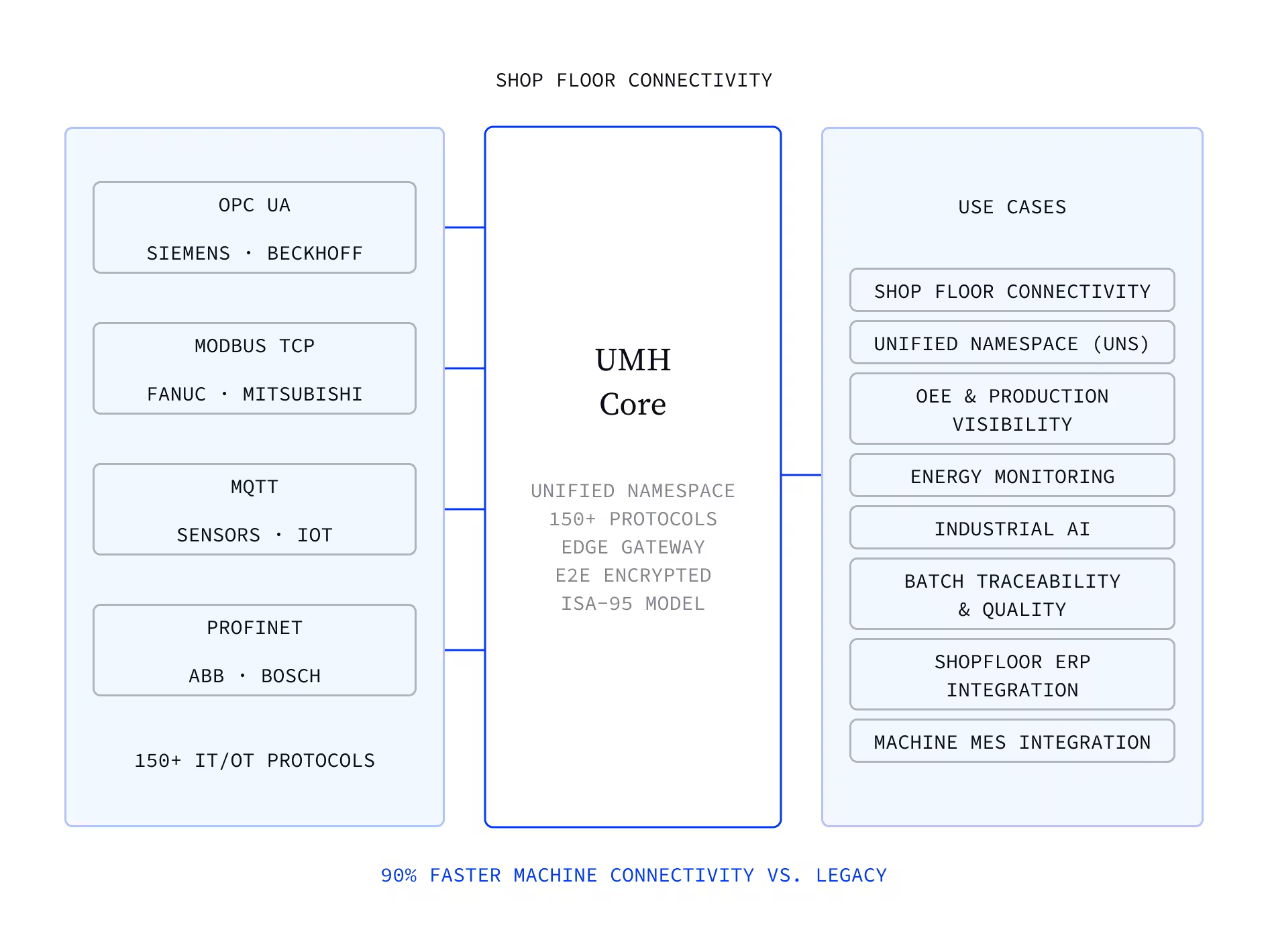

Pre-built templates for most major vendors: Siemens, Beckhoff, Softing, Kepware, and others
Full lifecycle management and monitoring across hundreds of connections
All major industrial protocols (OPC UA, MQTT, Modbus, S7, EtherNet/IP, SECS/GEM, and more)
Fast, easy machine connectivity with reusable templates
API for AI agents to build and manage connections programmatically
100% open source (Apache 2.0)
Trusted by global enterprises










The Challenge
Your factory has connected islands, but no single view
Connectivity exists, but only where it was worth the project
Most factories have pockets of connectivity, the high-value lines that justified a dedicated integration project. But between those islands, data stops. Getting a complete picture means stitching together disconnected systems, and nobody has the bandwidth to do that for every machine.
Every use case is waiting for data that isn't there yet
OEE & production visibility, energy monitoring, predictive maintenance, the roadmap is full of initiatives that need machine data. But each one stalls at the same point: the data isn't connected yet. Not because it's impossible, but because connecting has always been too slow and too expensive to do for everything.
The more you automate, the more you need to connect
Every new automation system, every additional sensor, every line upgrade adds another data source that needs integration. The demand for connectivity is growing faster than teams can deliver it. What worked as one-off projects can't keep up with a factory that's automating at scale.
"With UMH, we gained real-time insight into our production for the first time. The platform’s flexibility allowed us to connect all our machines and drastically reduce manual data work. This has been a game-changer for our efficiency."

Ludwig Hösl
Head of Manufacturing IT
.avif)
Our solution
All major protocols. Easy for everyone. Scales across your organization.
UMH connects to all major industrial protocols out of the box. The Management Console makes it easy for OT engineers to connect machines in minutes. For IT teams and AI agents, everything is code: YAML configs you can version-control, generate, and replicate. Template one connection, share it across your organization, and scale to hundreds of sites.

All major industrial protocols supported. Pre-built templates for most vendors. Select a template, enter the IP, and data starts flowing. First-time OT users connect machines without writing a single line of code.
Connect anything, fast
Every connection is YAML under the hood. IT teams version-control configs in Git. AI agents generate and deploy connections via API. What takes hours manually takes seconds programmatically.
Scale with code and AI agents
Create a connection template once and share it across your organization. When the next site has the same machine, they pick the template and go. No re-engineering, no re-learning.
Templatize, standardize, share
Full lifecycle management for every connection: monitoring dashboards, logging, alerting, and a built-in Prometheus endpoint. No middleware on the market covers this scope, from protocol adapter to observability, in a single platform.
Fully governed from day one
From template to streaming data in four steps
Step
Pick a template
Start with a pre-built template for your machine vendor and protocol.
step
•
TEXT
Pick a template
The format:
- 30 minutes to code.
- 15 minutes to discuss what you'd change to make it production-ready.
The format:
- 30 minutes to code.
- 15 minutes to discuss what you'd change to make it production-ready.
The format:
- 30 minutes to code.
- 15 minutes to discuss what you'd change to make it production-ready.
Step
Configure
Enter your connection details: IP address, port, data points.
step
•
TEXT
Configure
The format:
- 30 minutes to code.
- 15 minutes to discuss what you'd change to make it production-ready.
The format:
- 30 minutes to code.
- 15 minutes to discuss what you'd change to make it production-ready.
The format:
- 30 minutes to code.
- 15 minutes to discuss what you'd change to make it production-ready.
Step
Contextualize
Clean, transform, and enrich the data in-flight, before it reaches your systems.
step
•
TEXT
Contextualize
The format:
- 30 minutes to code.
- 15 minutes to discuss what you'd change to make it production-ready.
The format:
- 30 minutes to code.
- 15 minutes to discuss what you'd change to make it production-ready.
The format:
- 30 minutes to code.
- 15 minutes to discuss what you'd change to make it production-ready.
Step
Push to the Unified Namespace
Data lands in the UNS, ready for any downstream application to consume: dashboards, historians, AI models.
step
•
TEXT
Push to the Unified Namespace
The format:
- 30 minutes to code.
- 15 minutes to discuss what you'd change to make it production-ready.
The format:
- 30 minutes to code.
- 15 minutes to discuss what you'd change to make it production-ready.
The format:
- 30 minutes to code.
- 15 minutes to discuss what you'd change to make it production-ready.
Frequently asked questions.
How long does deployment take?
Does UMH support my specific protocol?
What happens to my existing Kepware setup?
Is UMH truly open source?
How does pricing work?
Get the Shop Floor Connectivity one-pager
Share it with your team or take it into your next shop floor connectivity conversation with management.


START WITH UMH
Start connecting your shop floor
Talk to our team about your specific machines and protocols. Or explore the platform yourself, fully open source.