Industrial AI
The data platform for AI on the shop floor.
AI needs factory data it can work with. UMH gives you a structured, unified data layer that your own AI can build on, from OEE dashboards to energy monitoring and automated workflows.

Trusted by global enterprises










Current status
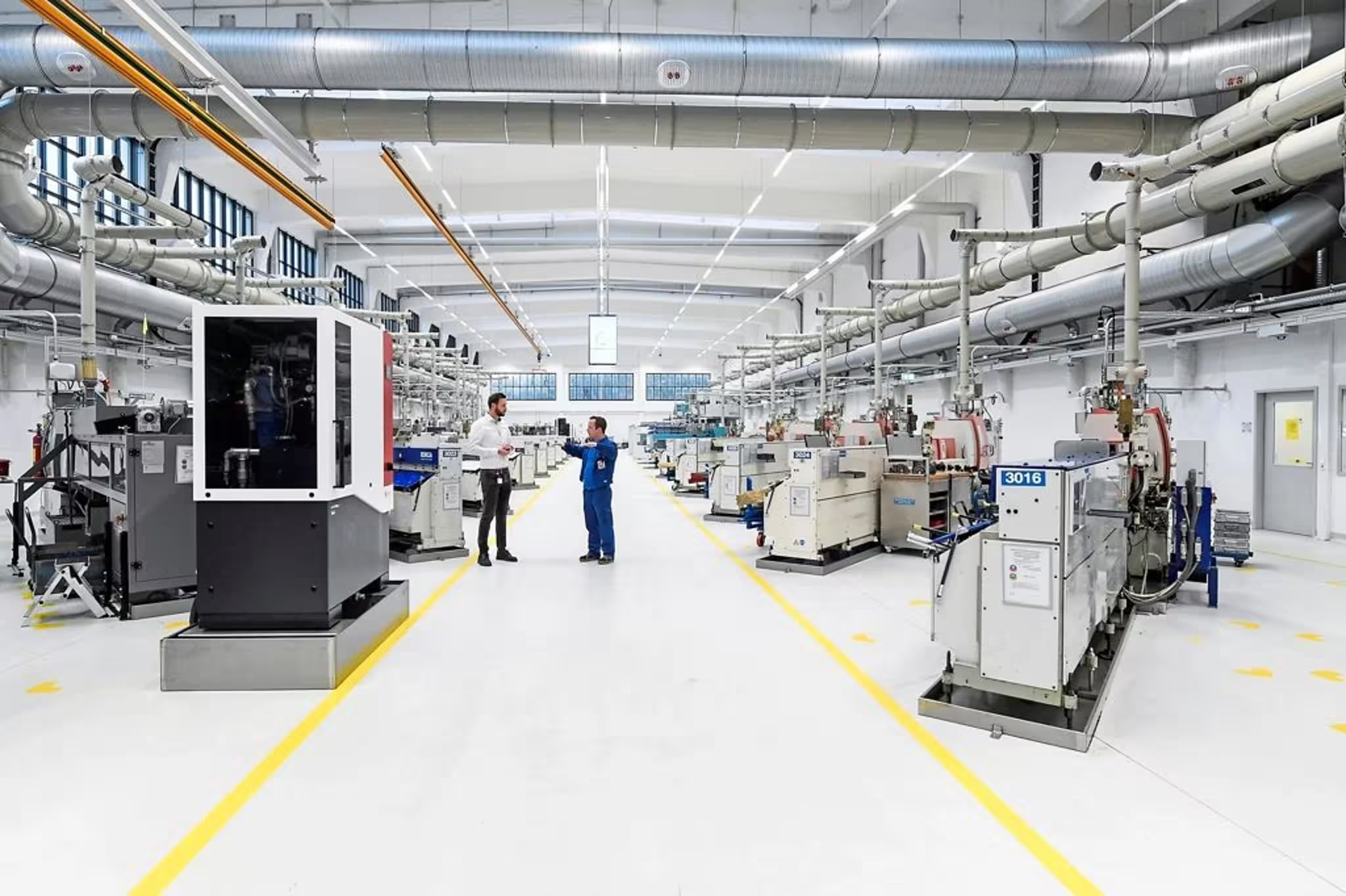
AI is on the roadmap, but the data is not ready.
Data is scattered and lacks context
Good AI results depend on good data. Today, machine data is spread across PLCs, historians and MES from different vendors. Raw values like "DB12.W4" don't provide enough context and leave the AI guessing.
The effort to get there is too high
Every use case turns into its own integration project, as the data isn't available in one place. Connecting machines by hand is slow and expensive, so many companies never get past the first one.
Opening production to AI feels risky
Machines run in OT, the most sensitive part of the network. Giving an AI access without clear limits and control puts production at risk.
"AI is a topic where almost daily I get asked by top management: what are we doing with AI in production? And I always have to explain that you need to have data to start. Therefore, my standard answer is: what we are doing with AI is providing a common data platform with UMH so that we'll be able to use it"

Marcel Rösner
Head of Digital Transformation Accelerator
Our solution
The data foundation for your AI.
UMH connects your machines and systems, then models and standardizes their data in a Unified Namespace, so you have one source of truth. The AI systems your company already uses can work with it at every step, from installation to dashboards.
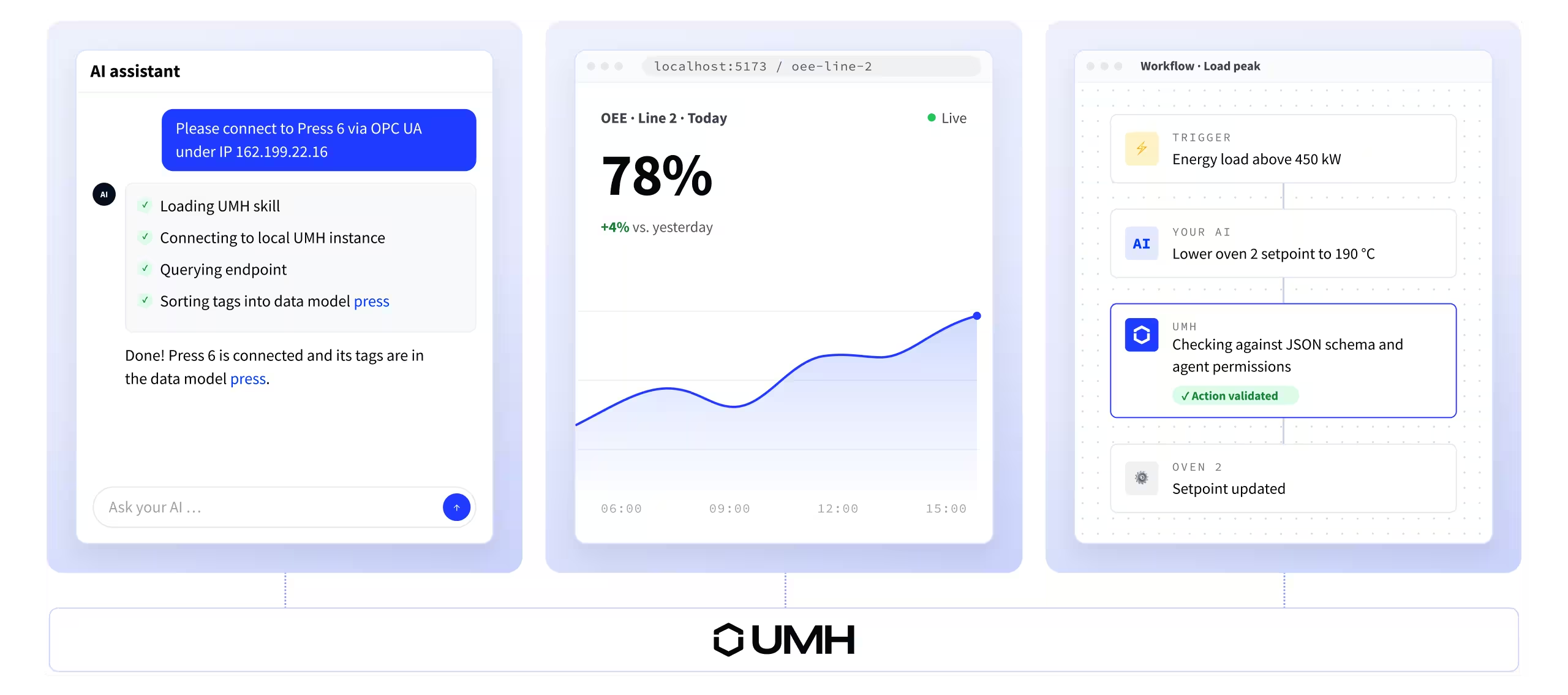
Use AI to install UMH, connect your machines and build the data models. You describe what you need in a prompt, and your AI does the setup. Everything in UMH is defined in code, so the AI knows exactly what to configure.
Configure with AI
Let your AI build dashboards, reports and analyses. With a structured data foundation from UMH, AI can cover many use cases, such as machine performance, OEE, downtime reasons and more.
Use data with AI
Your AI takes over repetitive tasks and follows the rules your team defined. UMH checks every command against those rules and the current machine state before it reaches production. Anything outside is blocked.
automate workflows with AI




Control stays with your team.
How UMH and AI work together.
Step
Connect
Your AI sets up the connections to your machines and systems, using PLC exports, handbooks or tag lists. Your OT team defines the rules AI should follow.
step
•
Connect
The format:
- 30 minutes to code.
- 15 minutes to discuss what you'd change to make it production-ready.
The format:
- 30 minutes to code.
- 15 minutes to discuss what you'd change to make it production-ready.
The format:
- 30 minutes to code.
- 15 minutes to discuss what you'd change to make it production-ready.
Step
Model
The AI sorts raw tags into structured data models. Every machine in each line and site follows the same structure.
step
•
TEXT
Model
The format:
- 30 minutes to code.
- 15 minutes to discuss what you'd change to make it production-ready.
The format:
- 30 minutes to code.
- 15 minutes to discuss what you'd change to make it production-ready.
The format:
- 30 minutes to code.
- 15 minutes to discuss what you'd change to make it production-ready.
Step
Integrate
From UMH, the contextualized data flows to the systems that need it: ERP, MES, historian or BI tools. Your AI configures these data flows and acts only within the limits you defined.
step
•
TEXT
Integrate
The format:
- 30 minutes to code.
- 15 minutes to discuss what you'd change to make it production-ready.
The format:
- 30 minutes to code.
- 15 minutes to discuss what you'd change to make it production-ready.
The format:
- 30 minutes to code.
- 15 minutes to discuss what you'd change to make it production-ready.
Step
Build
Using the data foundation, AI builds what your teams work with: dashboards, reports and automated workflows. Each new use case builds on the same data.
step
•
TEXT
Build
The format:
- 30 minutes to code.
- 15 minutes to discuss what you'd change to make it production-ready.
The format:
- 30 minutes to code.
- 15 minutes to discuss what you'd change to make it production-ready.
The format:
- 30 minutes to code.
- 15 minutes to discuss what you'd change to make it production-ready.
Frequently asked questions.
Can I bring my own AI models and use cases?
What happens when an AI agent sends a bad command?
Does this replace our existing systems?
Where is our data hosted?
How long does deployment take?
Does UMH use our data to train AI models?
Is UMH an industrial AI platform?
START WITH UMH
Bring AI to your shop floor.
We'll look at your use case, your current setup and what a 4–6 week pilot could look like.