Condition Monitoring & Alerting
Catch the Problem Before It Stops the Line.
Most factories find out a machine is in trouble the same way they always have: it stops. UMH connects directly to your machines, monitors their condition in real time, and routes alerts to the right person before a deviation becomes a breakdown. Reactive maintenance is a choice. You can choose differently.
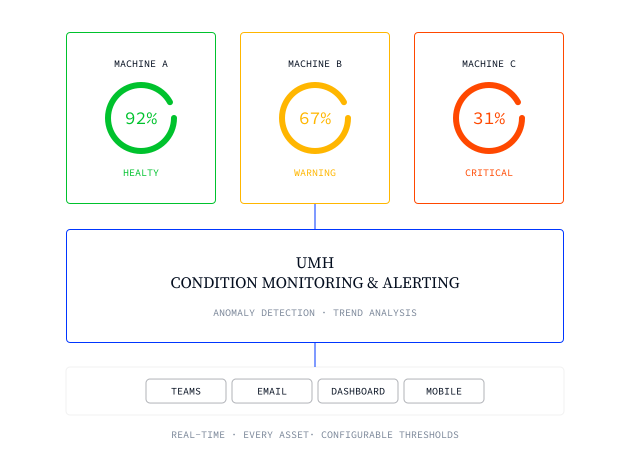

Automated deviation alerts routed to Teams, Slack, email, or SMS
Role-specific dashboards: operator, maintenance engineer, plant director
Real-time machine condition monitoring across every asset and line
Configurable thresholds: temperature, vibration, pressure, cycle time, and more
Historical trend analysis spanning weeks to years for pattern detection
Open source, no per-tag licensing, no proprietary lock-in
Trusted by global enterprises









The Challenge
Your maintenance team is always one step behind the machine
You find out something is wrong when production stops
Most factories still detect machine problems the same way: an operator notices unusual noise, a line goes down, or an end-of-shift log surfaces a fault that happened three hours ago. The machine state is visible inside the PLC. But without the infrastructure to surface it in real time, that signal never reaches the people who can act on it. Detection happens after the damage. Not before.
The more machines you monitor, the harder it gets to spot what matters
Every line, every cell, every asset produces signals. Temperature readings, cycle time deviations, pressure trends, vibration values. In a plant with dozens of assets, the volume overwhelms the team. Alerts that aren't properly configured fire constantly or not at all. Maintenance engineers spend more time chasing false positives than real problems. The result is alert fatigue: teams learn to ignore the system, and the one alert that actually matters gets missed.
Condition data exists in isolation, never in context
A PLC holds a temperature reading. A SCADA screen shows a cycle time. An energy meter logs a current spike. None of these systems talk to each other, and none of them know what production was running at the time. Without cross-system context, a deviation is just a number. Understanding whether it matters, and why, still requires an experienced engineer to manually investigate across three different tools. The faster your plant moves, the more that gap costs you.
"With UMH, we gained real-time insight into our production for the first time. The platform’s flexibility allowed us to connect all our machines and drastically reduce manual data work. This has been a game-changer for our efficiency."

Ludwig Hösl
Head of Manufacturing IT
.avif)
Our solution
Real-time condition monitoring, from machine signal to the right person's screen.
UMH connects directly to your machines via OPC UA, S7, Modbus, and other industrial protocols, capturing machine states, process values, and sensor readings as they happen. Deviation rules fire alerts the moment a threshold is crossed, and UMH routes them directly to the right person via Microsoft Teams, Slack, email, or SMS. Because all of this runs on the same Unified Namespace as your OEE, energy, and production data, every alert arrives with the context needed to act, not just a raw signal with a timestamp.

UMH connects to PLCs, sensors, drives, and controllers via all major industrial protocols out of the box. Temperature, vibration, pressure, cycle time, current draw, and any other value your machine exposes can be monitored. No custom integration code, no proprietary sensor gateway required.
Connect any machine, monitor any signal
Configure alert rules against real process parameters: trigger an alert when a value exceeds a limit, when it breaches a threshold averaged over a time window, or when two conditions occur simultaneously. Alerts pause automatically during planned maintenance windows. Engineers can temporarily hold individual alerts without switching off the whole system.
Thresholds that fit your actual process
Route every alert to the right team via Microsoft Teams, Slack, email, Telegram, or SMS. Notification policies match alerts to contact points by label, so a temperature deviation on line three goes to the maintenance team for line three, not a shared inbox that nobody checks. The right person gets notified before a minor anomaly becomes a major stoppage.
Alerts that reach the right person, fast
Every alert surfaces in Grafana alongside the full machine history, production order context, and related process parameters. Maintenance engineers don't start their investigation from scratch. The data needed for root cause analysis is already there, in the same view as the alert that triggered the response.
Context, not just a signal
From machine signal to resolved alert in four steps
Step
Connect your machines
UMH connects to PLCs and sensors via OPC UA, S7, Modbus, EtherNet/IP, and more. Any signal your machine exposes is available for monitoring within minutes.
step
•
TEXT
Connect your machines
The format:
- 30 minutes to code.
- 15 minutes to discuss what you'd change to make it production-ready.
The format:
- 30 minutes to code.
- 15 minutes to discuss what you'd change to make it production-ready.
The format:
- 30 minutes to code.
- 15 minutes to discuss what you'd change to make it production-ready.
Step
Define your thresholds and alert rules
Configure what normal looks like for each asset: set threshold values, time-window averages, and multi-condition rules that reflect your actual process parameters, not generic defaults.
step
•
TEXT
Define your thresholds and alert rules
The format:
- 30 minutes to code.
- 15 minutes to discuss what you'd change to make it production-ready.
The format:
- 30 minutes to code.
- 15 minutes to discuss what you'd change to make it production-ready.
The format:
- 30 minutes to code.
- 15 minutes to discuss what you'd change to make it production-ready.
Step
Route alerts to the right person
Set up contact points for each team and link them to alert rules by label. Every deviation reaches the person who can act on it, via the channel they actually use.
step
•
TEXT
Route alerts to the right person
The format:
- 30 minutes to code.
- 15 minutes to discuss what you'd change to make it production-ready.
The format:
- 30 minutes to code.
- 15 minutes to discuss what you'd change to make it production-ready.
The format:
- 30 minutes to code.
- 15 minutes to discuss what you'd change to make it production-ready.
Step
Investigate with full context
When an alert fires, Grafana surfaces the triggering signal alongside machine history, production order data, and related process parameters. Root cause analysis starts with everything in one view.
step
•
TEXT
Investigate with full context
The format:
- 30 minutes to code.
- 15 minutes to discuss what you'd change to make it production-ready.
The format:
- 30 minutes to code.
- 15 minutes to discuss what you'd change to make it production-ready.
The format:
- 30 minutes to code.
- 15 minutes to discuss what you'd change to make it production-ready.
Frequently asked questions.
What if we already have SCADA alerts configured in Ignition or Wonderware?
Can we configure alerts based on trends, not just threshold breaches?
How long does it take to get condition monitoring live on a first line?
Does UMH work with our existing sensors, or do we need new hardware?
Get the Condition Monitoring & Alerting one-pager
Share it with your team or take it into your next condition monitoring & alerting conversation with management.


START WITH UMH
Stop finding out about machine problems after they cost you.
Talk to our team about connecting your machines and getting real-time condition monitoring live in your plant. Or explore the platform yourself, fully open source.