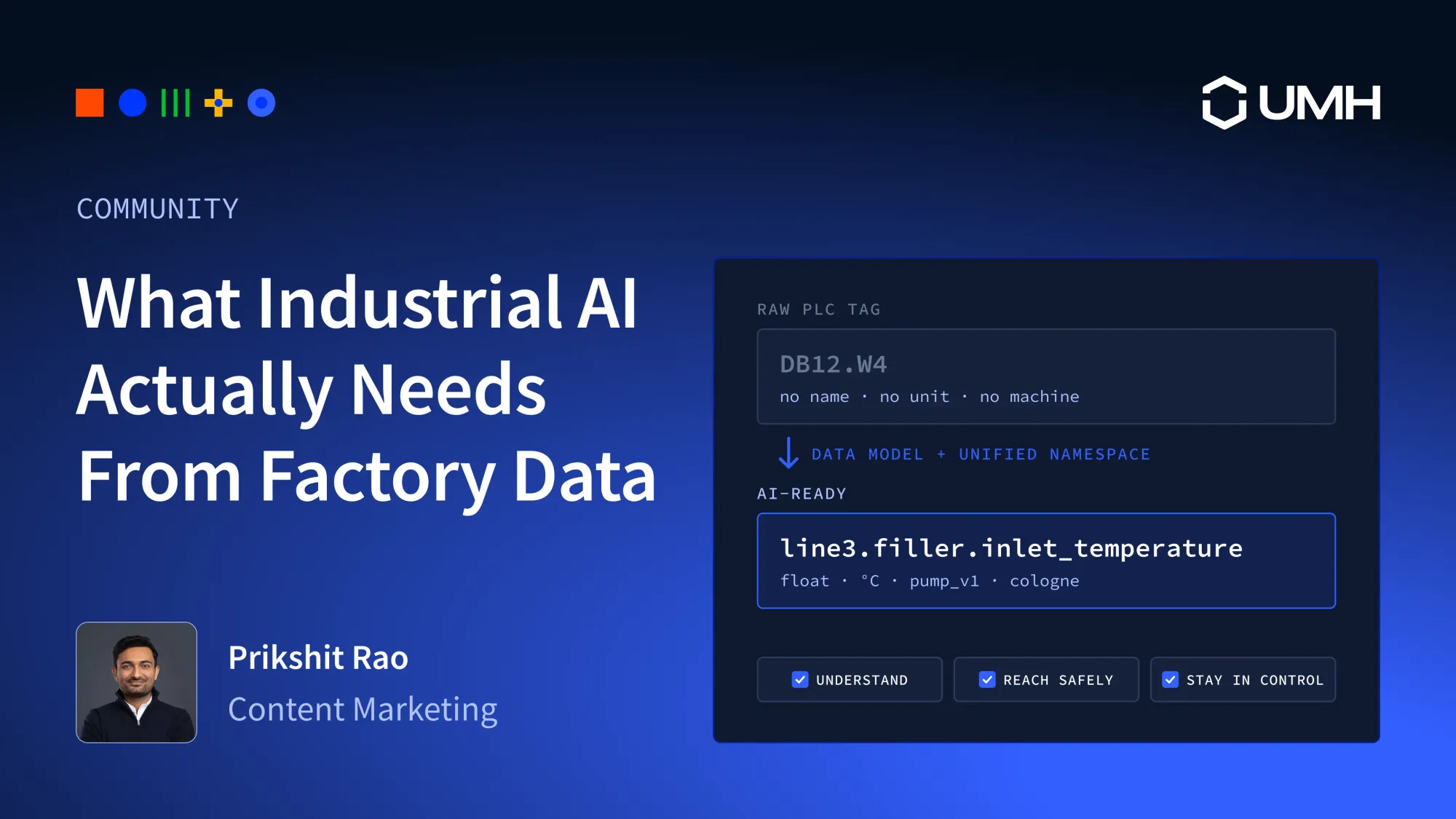
In short: Most industrial AI projects stall on the data, not the model. Machine values sit in PLCs, historians and MES systems without names or units, and every new use case needs its own integration. This guide gives you seven requirements to check your data against, grouped by three questions: can an AI agent understand the data, can it reach the data safely, and do you stay in control of it? Get those right and work that used to take weeks takes minutes. In a recent UMH demo, an AI agent connected two machines, modeled their data and built three dashboards with alerting in under half an hour.
Ask a plant manager what the factory is doing with AI, and the honest answer is usually a pilot. One line, one use case, a lot of manual data work, and no clear path to the second line. The model is rarely the problem. The data underneath it is.
"AI is a topic where almost daily I get asked by top management: what are we doing with AI in production? And I always have to explain that you need to have data to start. Therefore, my standard answer is: what we are doing with AI is providing a common data platform with UMH so that we'll be able to use it." Marcel Rösner, Head of Digital Transformation Accelerator
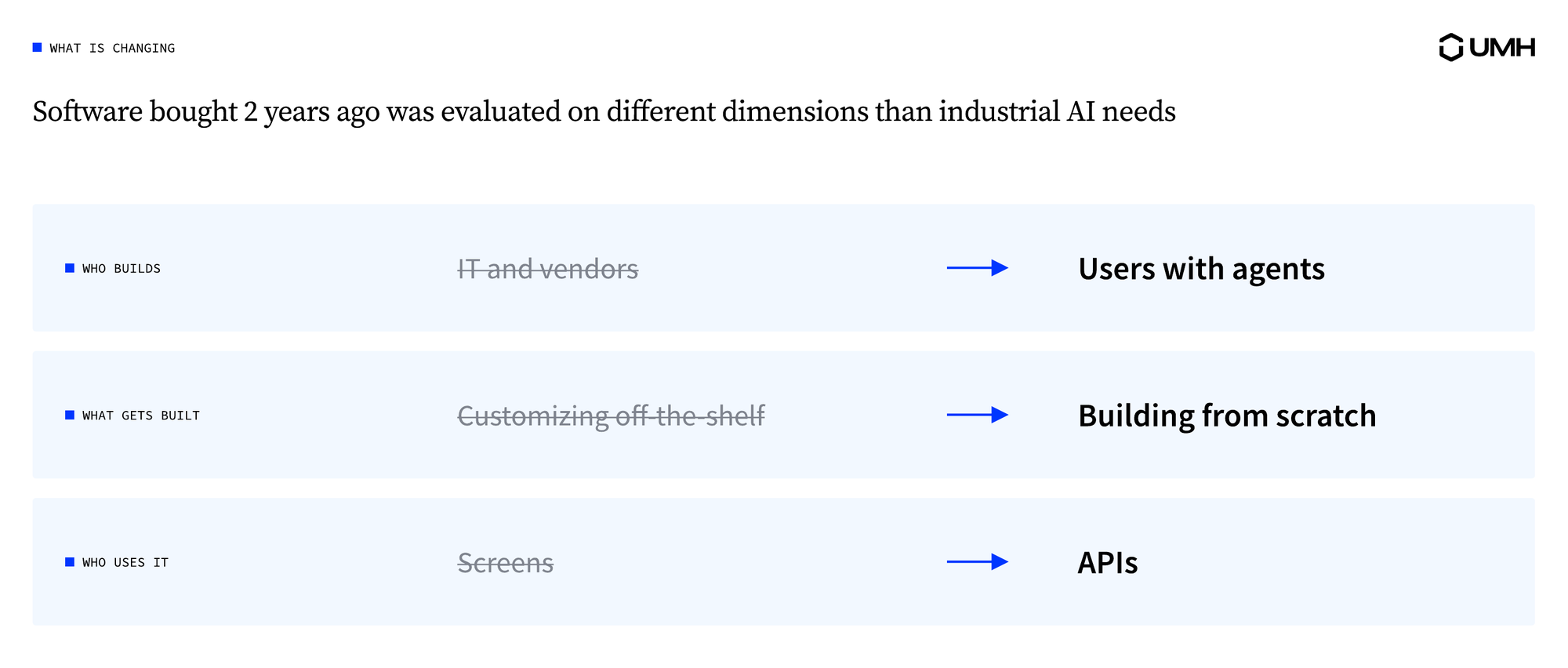
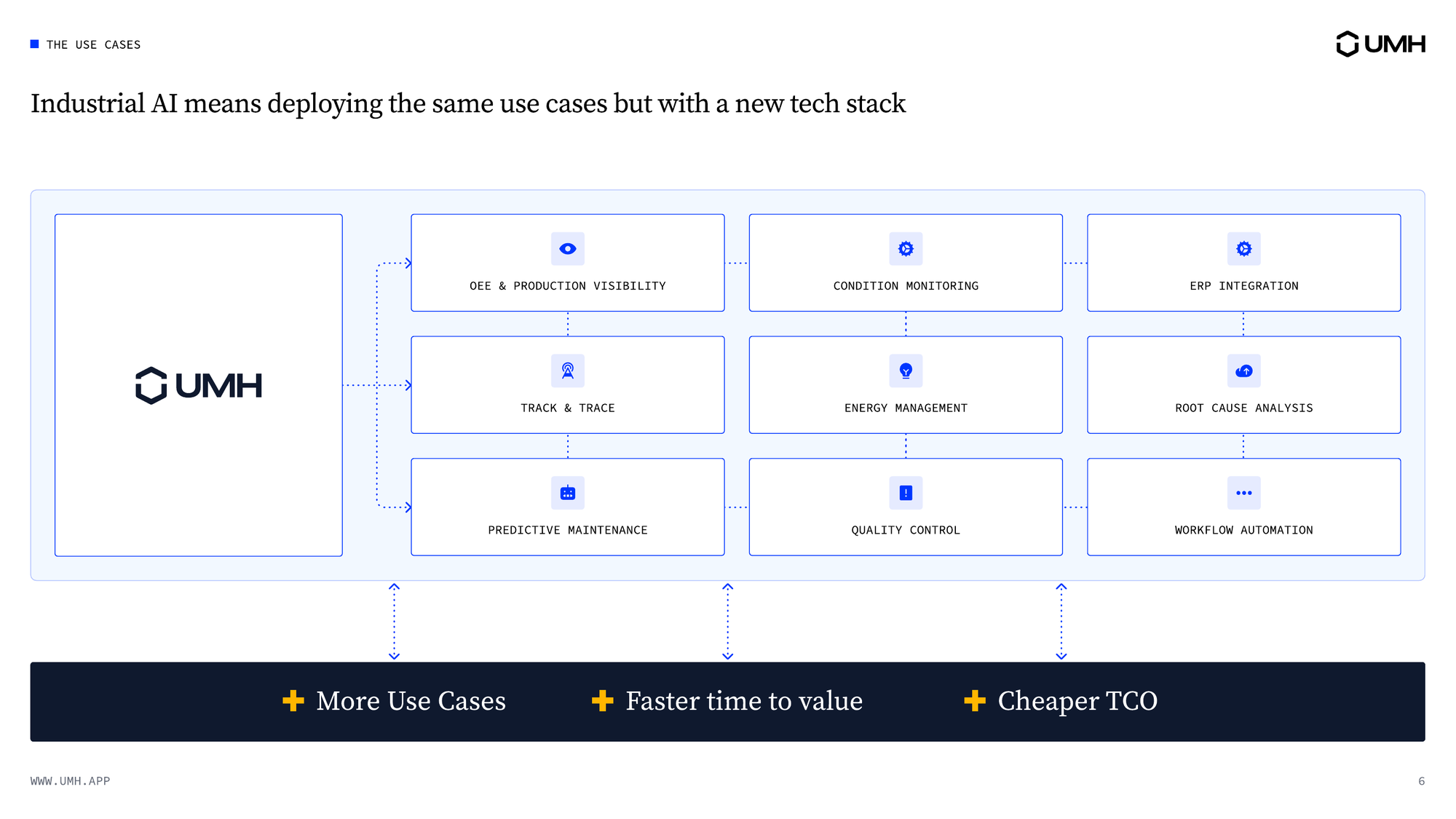
The use cases stay the same. The builders don't.
Plants still want what they wanted two years ago: better visibility, faster reaction times and higher yield. What changed is who builds the applications, and how.
- Engineers build, with AI agents. Factory software used to be bought as a product and customized by the vendor or a consultancy. Now engineers in the plant do that work themselves, with an AI agent such as Claude Code that reads documentation, runs commands and writes configuration.
- Built for one job. Instead of bending a standard application to fit, teams build small applications for one need, often for one role or one line.
- APIs instead of screens. People and agents increasingly use tools through their APIs rather than a user interface. That now includes the software that holds the factory's data.
When each use case is fast to build and cheap to run, it pays to build many small ones. At one customer plant, a single engineer now builds about ten times as many use cases as two years ago, across maintenance, automation, industrial engineering and production, using an AI agent and the UMH APIs.
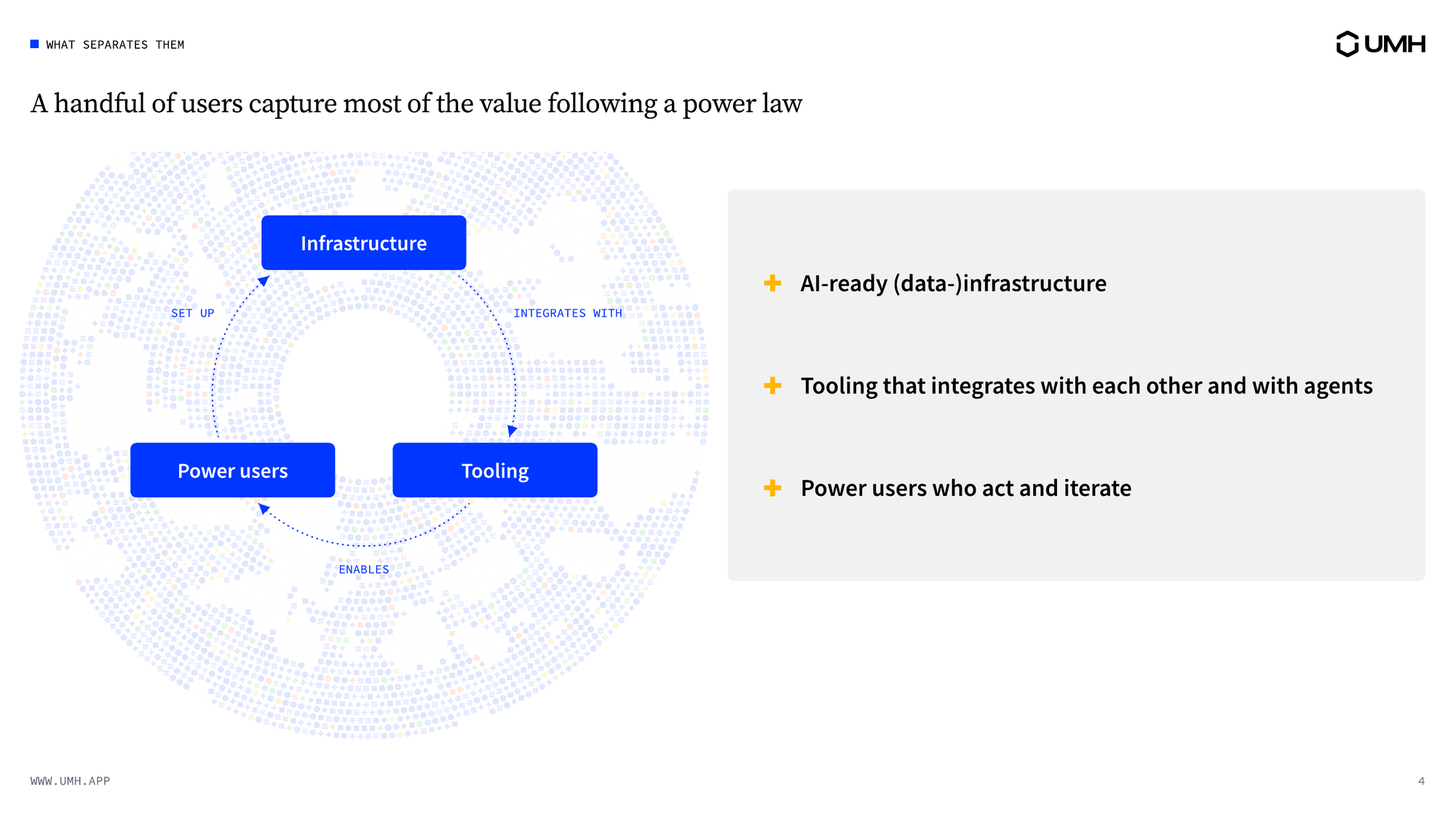
The plants that move fastest have three things in place:
- A data platform that makes machine data accessible, structured and consistent.
- AI agents that can do real engineering work, which a chatbot can't.
- Power users: engineers who know the process and use agents to build on the data platform.
The three feed each other. Power users set up the data platform with agents, the data platform makes the agents more useful, and every use case makes the next one easier. Take away the data platform, though, and the other two have nothing to work with.
That's why industrial AI is a data problem first. The seven requirements below are grouped by the three questions from the top: can an agent understand the data, can it reach it safely, and do you stay in control? Each one ends with a question to put to any vendor, and the answer that should make you cautious. We call data that meets all seven AI-ready.
1. AI agents can only use data they understand
Requirement 1: Every value carries its meaning
An AI agent needs to know what a value is, not only where it came from. That means a name, a type, a unit and the machine it belongs to. Compare a raw PLC address:
with the same value in a Unified Namespace, a shared structure where every machine and system publishes its data under a readable address:
The second address tells the agent the site, the line and the machine. It also says the value follows the pump v1 data model, a template that defines which values a machine type has, with their names, types and units. People need the same thing: if you can't tell how the data is structured, you can't act on it.
Ask the vendor: How does a raw tag become a named, typed value?
Be cautious if: the answer is a tag-mapping spreadsheet that someone maintains by hand.
Requirement 2: One structure across lines and sites
A model trained on line 3 only works on line 7 if line 7's data looks the same. The same goes for the question AI gets asked most often in manufacturing: comparing OEE (overall equipment effectiveness) across plants.
The data also needs to be in a usable shape before anything reads it. If a machine reports a counter and you need produced quantities, convert the counter. If six machines report their state with six different sets of error codes, map them to one shared set of machine states. An agent that reads raw, inconsistent signals produces numbers nobody can compare.
The fix is one data model per machine type: define it once, then apply it to every machine of that type, at every site.
Ask the vendor: How do we reuse a data model on the next machine or site?
Be cautious if: every new machine starts as its own integration project.
Requirement 3: History next to real-time
Real-time data shows what is happening now. Training, baselines and anomaly detection need the past. What did normal look like last month, and when did the drift start? AI-ready data keeps both in the same structure, so an agent can move from history to live values without remapping tags.
Ask the vendor: Where does historical data live, and how do we query it?
Be cautious if: history sits in a separate system with its own naming and its own query tool.
2. AI agents need a safe way in
Requirement 4: Access through standard interfaces
Your AI setup will change, so the way in to your data shouldn't depend on it. Today it may be a model in Azure. Tomorrow it may be Databricks, a model on your own servers, or an agent framework that doesn't exist yet. If factory data is only reachable through one vendor's proprietary API, every change means a new integration.
AI-ready data is available through standard interfaces: MQTT or Kafka for streams, REST for queries, SQL for history. The cloud becomes one destination among several, not the place the data has to live.
Ask the vendor: How does our AI agent read and configure the platform?
Be cautious if: the only way in is the vendor's own SDK or its built-in assistant.
Requirement 5: Guardrails on everything that writes back
Reading data is low-risk. Writing back is where an agent can stop a line. Writing back means changing a setpoint, starting a job or adjusting a parameter. An agent's output is a prediction with a probability attached, so it needs guardrails: hard limits on what it may do. Before any agent acts on production, three rules should hold:
- The agent never connects to machines directly. It sends commands to the data platform.
- Every command is checked against rules your operational technology team defined, and against the current machine state. Anything outside those limits is blocked.
- Every action is logged, so you can see who or what changed what, and when.
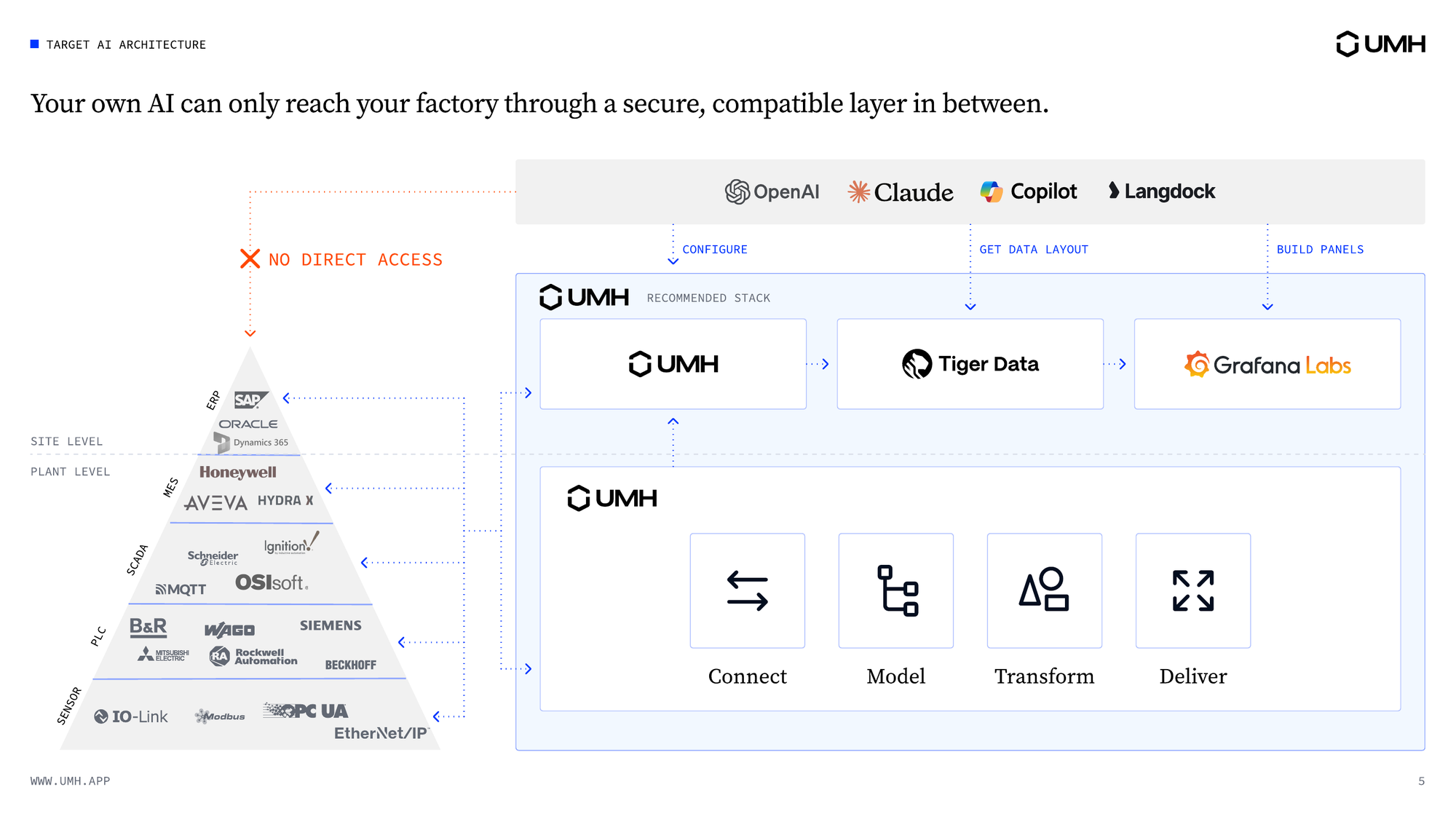
Most plants don't let agents change setpoints yet. Put the data platform and its guardrails between agents and machines now, so that when agents do start writing back, it happens under supervision.
Ask the vendor: What stops an AI agent from sending a bad command?
Be cautious if: the answer relies on the model behaving well, or on a human watching every action.
Requirement 6: Numbers come from code, not from the model
A language model can give two different answers to the same question, and sometimes a wrong number. That's fine for a draft. It's not fine for the OEE figure a plant manager reports to management.
What works in production is to let the agent generate the logic once (a data model, a calculation, a dashboard query), freeze that logic as code, test it, and run the same code every time. The agent sees the database structure, its tables and data models, but it doesn't sit between the user and the data. The dashboard reads from the database through the query the agent wrote.
Ask the vendor: Where do the numbers on the dashboard come from?
Be cautious if: every chart is a live call to a model.
3. The data has to stay under your control
Requirement 7: You decide where data and models run
For many manufacturers, especially in Europe, the first question about any AI project is where the data goes. The right data platform leaves three decisions with you:
- Where the data platform runs: on your own servers, at the edge (on hardware next to the machines) or in your own cloud tenant.
- Which AI models you use: the ones your company already uses, a large cloud provider's, or a European offering such as the EU's AI Factories initiative.
- Whether the vendor sees your data at all: a data platform has no reason to train AI models on your production data.
Ask the vendor: Where does our data go, do you train on it, and what happens if we leave?
Be cautious if: the platform only runs in the vendor's cloud, or leaving means exporting from a closed format.
Edge, cloud, or both
Most factory AI ends up hybrid. Time-critical logic, such as alarms, quality checks and anything that writes to machines, runs at the edge, next to the line. Training and cross-site analytics often run in the cloud, where compute is easier to get.
To keep your options open, structure and govern the data at the source, on your own infrastructure, then stream it to whichever cloud service or AI model needs it. If you switch clouds, or bring a workload back to your own servers, the data platform stays the same.
What this looks like in practice: two ovens, three dashboards
In UMH's industrial AI webinar, Marius, Product Manager at UMH, ran the full setup live on a laptop. He used UMH Core, UMH's open-source software that runs on your own hardware. Two simulated ovens ran on a simulated PLC that speaks OPC UA, a standard industrial protocol. The agent was Claude Code, set up to work from the official UMH documentation, so every step followed the docs. Marius started from a CSV export of the PLC tags: name, OPC UA endpoint, temperature, setpoint and the other signals.
In the table, a bridge is a connection that moves data between UMH and another system, such as a PLC or a database. The historian is the database that stores the data over time, and Grafana is an open-source dashboard tool.
After each step, Marius checked the result in the Management Console, UMH's web interface: the instance online, the historian plugin enabled, the data model in place, and the Celsius conversion in the bridge configuration.
Without AI agents, the same work typically took:
Dashboards take the most time, so that's where agents save the most. Nobody wrote code by hand.
"Why not just buy an AI platform?"
Because AI agents change every few months, and most companies will end up using several. An AI platform that brings its own data integration solves the data problem for one agent. When you add the next one, you start again.
Factory data that meets the seven requirements works with any agent you pick, now and later. That's why the data platform comes first.
The seven requirements on one page
Use this table with any vendor, including us:
Where UMH fits
UMH is the data platform industrial AI runs on. It doesn't bring an AI of its own: you bring the agent your company already uses, and UMH gives it structured data, standard interfaces and guardrails.
- Configure with AI: everything in UMH is defined in code, so an agent can set up bridges and data models from a prompt, a PLC export or a tag list. Your engineers review the result in the Management Console.
- Build use cases with AI: on structured data, an agent can build dashboards, reports and alerts that read straight from the historian.
- Guardrails: every command passes the three checks from requirement 5 before it reaches production.
- Runs on your infrastructure: UMH Core is open source under Apache 2.0, and UMH does not train AI models on your data. UMH is a German company based in Cologne.
In a Forrester Total Economic Impact study, UMH delivered a 426% ROI and €4.9M net present value for a composite organization that Forrester modeled from customer interviews.
Start with one use case
Industrial AI is a data problem, so start with the data, not with an AI platform tender. Pick one use case that needs clean data anyway, such as OEE on one line or energy per unit produced, and connect the machines and build the data models it needs. The second use case reuses that data instead of starting from zero.
UMH Core is free to run. The getting started guide gets a first machine into the Unified Namespace. For multi-site management and support, see pricing.
Watch Marius run the demo: two ovens, from first connection to first dashboard.
Frequently asked questions
Do we need an AI platform or a data platform first?
A data platform. AI agents change fast, and most companies will use several. Factory data that is structured, governed and reachable through standard interfaces works with all of them. Data locked inside one AI vendor's platform works with one.
What makes factory data "AI-ready"?
Seven things: meaning on every value, one structure across lines and sites, history next to real-time data, standard interfaces, guardrails on write-back, numbers that come from code, and control over where data and AI models run.
How fast can an AI agent set up a connection and a dashboard?
In a live UMH demo, an AI agent set up UMH Core with the historian and Grafana, connected a simulated oven over OPC UA, built its data model and created a dashboard with alerting, each step in a few minutes. Before AI agents, connecting a PLC typically took up to five days, a data model up to three weeks and dashboards up to four weeks.
Which AI agent works with UMH?
Any capable one. The webinar demo used Claude Code. What matters is that the agent works from the official UMH documentation, so its configuration follows the documented structure.
Can AI agents write back to machines safely?
Only through a checked interface. An AI agent should never connect to a PLC directly. In UMH, every command is checked against rules your team defined and against the current machine state before it reaches production, and every action is logged.
Is UMH an industrial AI platform?
UMH is the data platform that industrial AI runs on. It connects and structures your production data, and you use the AI agent your company already works with.
Does UMH use our data to train AI models?
No. UMH has no AI model of its own. You bring your own AI models, and your data stays with you.
Can we use Azure, AWS or Databricks for AI?
Yes. UMH structures the data at the source and streams it to the cloud or analytics platform you choose.
Is there an open-source industrial AI platform?
For the data platform, yes: UMH Core is open source under Apache 2.0 and free to run in production. The AI models are your choice, open-source or commercial.